
Lyric video creation process: your 2026 guide
Discover the lyric video creation process in 2026. Learn to sync visuals and lyrics quickly and effectively for music promotion across platforms.

Lyric video creation process: your 2026 guide
TL;DR:
- Creating lyric videos involves synchronizing song lyrics with visuals to promote music across platforms. Proper preparation, including finalizing audio and proofreading lyrics, saves time and ensures quality. Building one master horizontal video from which to derive all other formats optimizes multi-platform releases.
The lyric video creation process is defined as synchronising song lyrics with moving visuals to produce a shareable video that promotes your music across platforms like YouTube, TikTok, and Instagram Reels. Unlike a full music video, a lyric video focuses on text as the primary visual element, making it faster and cheaper to produce without sacrificing impact. The standard export format for 2026 is 1080p MP4, with 16:9 for YouTube and 9:16 for mobile platforms. Musicvideomarketplace enables musicians to go from audio file to published YouTube video in minutes, making this process accessible to artists at every level.
What does the lyric video creation process actually involve?
A lyric video is not simply text on a black screen. It is a production asset that, when built correctly, powers an entire multi-platform release system rather than a single video drop. The core workflow moves through five stages: preparation, design, text synchronisation, export, and publishing. Each stage feeds the next, and skipping one creates problems that compound later.

The preparation stage is where most creators lose time. Gathering your finalised audio, proofread lyrics, and visual references before opening any editing software saves hours of rework. The production stage covers font selection, background design, and animation choices. Synchronisation is the technical heart of the process, where each lyric line is timed precisely to the audio waveform. Export and publishing are where your single master video becomes multiple platform-ready assets.
Before you start: preparation steps that save hours
Preparation is the stage most musicians rush, and it is the one that costs the most time when skipped. The following checklist covers every prerequisite before you open your editing software.
- Finalise your audio mix. Locking your final mix before syncing text is non-negotiable. Swapping audio after sync breaks every timing cue and forces a full redo.
- Proofread your lyrics. Clean, proofread lyric text improves both AI syncing accuracy and manual editing results. Errors in your source text become errors on screen.
- Plan your visual style. Sketch a rough storyboard on paper. Decide on colour palette, font family, and background style before touching the software.
- Check rights and permissions. If you are using a song you did not write, confirm you hold the appropriate licence for video distribution on each platform.
- Set up your project correctly. Create a 1920x1080 canvas for YouTube and a separate 1080x1920 canvas for mobile. Name your files clearly from the start.
Pro Tip: Save your colour palette and font choices as a named preset in your editing software before you begin. This cuts setup time on every future project and keeps your visual identity consistent across releases.
The storyboard step is underrated. Even a rough pencil sketch of three or four frames tells you whether your visual concept actually works before you spend time building it digitally. Artists who skip this step often rebuild their background design halfway through production.
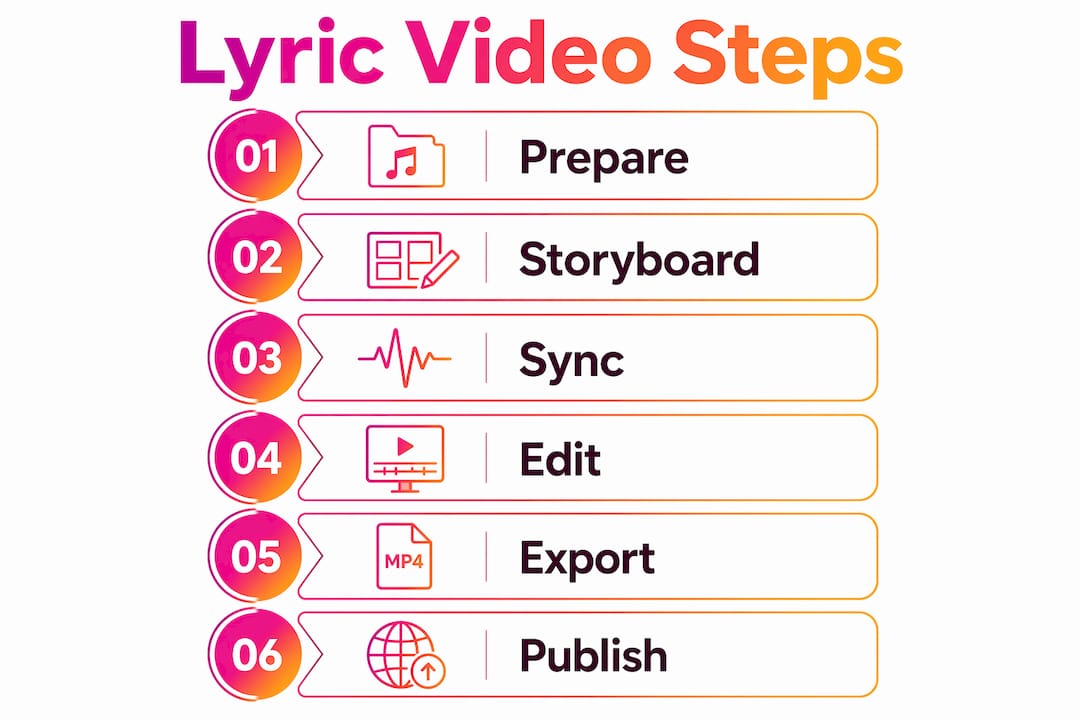
How to create a lyric video step by step
The following steps apply whether you are working in a professional video editor or a browser-based design tool. The principles of timing, readability, and visual hierarchy are the same across all platforms.
-
Import your audio and create a waveform track. Place your finalised audio file on the timeline. The waveform view shows you exactly where each word lands, which makes precise sync far easier than listening alone.
-
Add your first text box and style it. Choose a font that is legible at small sizes. Sans-serif fonts like Montserrat or Bebas Neue read clearly on both large screens and mobile. Set your font size to at least 60pt for a 1080p canvas.
-
Type the first lyric line and position it. Place text in the lower third of the frame for YouTube, or centred vertically for vertical formats. Avoid the very edges of the frame, as some platforms crop slightly on playback.
-
Sync the text clip to the audio. Drag the start of the text clip to align with the first word of that lyric line. Use the waveform as your guide. Trim the clip end to match the last syllable of the line.
-
Duplicate the text clip for the next line. Copy the styled text box, update the lyric text, and reposition the clip on the timeline. This preserves your font, size, and animation settings without rebuilding from scratch.
-
Apply animations with restraint. A simple fade-in or slide-up keeps the viewer’s eye on the words. Over-animation pulls attention away from the lyrics and makes the video feel busy. Readability is paramount; every design choice should serve the text, not compete with it.
-
Add your background visuals. Use abstract motion graphics, looping colour gradients, or subtle particle effects. The background should complement the mood of the song without distracting from the lyrics. Static backgrounds work well for emotional ballads; kinetic visuals suit high-energy tracks.
-
Preview the full video at least twice before exporting. Watch once for timing errors and once for readability on a small screen. Zoom your preview window down to simulate a mobile display.
Pro Tip: Export a low-resolution draft first and watch it on your phone. Text that looks large on a desktop monitor often reads as too small on a 6-inch screen. Adjust font size before your final export.
The music video production workflow that works best treats each step as a checkpoint rather than a continuous flow. Completing and reviewing each stage before moving to the next prevents compounding errors.
How do you optimise a lyric video for multiple platforms?
The master asset approach is the most efficient method for multi-platform publishing. You build one high-quality horizontal video first, then derive all other formats from it. Practitioners recommend establishing the master horizontal version before creating vertical and teaser cuts, as this preserves sync integrity across all outputs.
Resizing for different platforms is not simply a matter of cropping. Effective multi-format adaptation requires repositioning text, adjusting font sizes, and re-evaluating pacing for each aspect ratio. A lyric line that sits comfortably in the lower third of a 16:9 frame may be cut off entirely in a 9:16 crop.
| Output format | Aspect ratio | Platform | Key adjustment |
|---|---|---|---|
| Full lyric video | 16:9 | YouTube | Master asset; full song length |
| Vertical lyric video | 9:16 | TikTok, Reels | Reposition text to centre frame |
| Hook clip | 9:16 | TikTok, Reels | First 15–30 seconds; strong opening line |
| Chorus cut | 16:9 or 9:16 | YouTube Shorts, Stories | Most memorable section only |
| Captioned teaser | 9:16 | Instagram, Twitter/X | Silent-feed version with burnt-in captions |
Short-form video content drives music discovery in 2026, making the hook clip and chorus cut formats as important as the full video. A well-cut 20-second hook can generate more first-time listeners than the full upload.
Scheduling posts systematically prevents momentum loss during busy release weeks. Successful creators release deliberate follow-up clips over several days after the initial launch, rather than uploading everything at once and going quiet. Automated scheduling tools maintain consistent exposure without requiring you to be online at every posting time. For a deeper look at extending your reach after release, the guide on repurposing music videos covers the full strategy.
Common mistakes that ruin lyric videos
Most lyric video errors fall into a small number of categories. Knowing them in advance is far cheaper than fixing them after export.
- Unproofed lyrics on screen. A spelling mistake in your lyrics is visible to every viewer for the full duration of the song. Proofread your source text twice before importing it.
- Low contrast between text and background. White text on a light background, or dark text on a dark background, becomes unreadable on mobile screens in bright light. Test your colour contrast before finalising.
- Font sizes that are too small. Text that looks fine on a 27-inch monitor becomes illegible on a phone. Use a minimum of 60pt on a 1080p canvas and preview on a physical device.
- Rushed synchronisation. Lyrics that appear half a beat early or late feel amateurish and break the listener’s immersion. Take the time to align each clip to the waveform precisely.
- Over-animation. Spinning text, bouncing words, and constant transitions exhaust the viewer. Choose one or two animation styles and apply them consistently throughout.
- Swapping audio after sync is complete. Even a slightly different mix or master can shift the timing of every lyric cue. Finalise your audio before you begin syncing, without exception.
- Skipping the multi-device preview. Export a draft and watch it on your phone, your laptop, and a television if possible. Each screen reveals different readability issues.
Key takeaways
A lyric video built on a finalised audio file, proofread lyrics, and a clear visual plan produces a master asset that can power an entire multi-platform release campaign.
| Point | Details |
|---|---|
| Finalise audio before syncing | Swapping audio after sync breaks every timing cue and forces a full rebuild. |
| Proofread lyrics before importing | Errors in source text appear on screen for every viewer throughout the full video. |
| Build a master horizontal video first | Derive all vertical, hook, and teaser formats from one master to preserve sync integrity. |
| Prioritise text readability | Use minimum 60pt font on a 1080p canvas and test contrast on a physical mobile device. |
| Schedule follow-up clips after launch | Releasing deliberate cuts over several days sustains audience engagement beyond the initial upload. |
What I have learned from building lyric video workflows
The biggest shift in my thinking came when I stopped treating a lyric video as a finished product and started treating it as a content engine. Most musicians upload the full video and consider the job done. The artists who build real audiences use that one video to generate five or six pieces of content, each timed to a different moment in the release week.
The second thing I have learned is that creative freedom and production efficiency are not opposites. Establishing a repeatable template, with your fonts, colours, and animation presets locked in, does not limit your creativity. It removes the low-value decisions so you can focus on the choices that actually matter, like which lyric line makes the best hook clip or which background mood fits the bridge section.
Text readability against changing backgrounds is the technical challenge that trips up the most creators. My rule is simple: if you cannot read the lyrics clearly with the volume off, the background is too busy. A semi-transparent overlay behind the text block solves this in seconds and works on any background.
The final lesson is about the release strategy. Exporting your video is not the end of the process. Growing your YouTube audience after the initial release requires a deliberate posting schedule, not a single upload and hope. The creators who sustain momentum are the ones who planned their follow-up content before they pressed publish.
— Music
Musicvideomarketplace: your lyric video production resource
Musicvideomarketplace is built for musicians who want to move from audio file to published YouTube video without spending days in post-production.

The platform supports the full production workflow, from creating your long-form lyric video to launching an ad campaign for your song. Whether you are releasing your first single or managing a catalogue of tracks, Musicvideomarketplace gives you the tools to produce, publish, and promote without needing a production team behind you. The focus is on speed and quality, so your music reaches listeners while the release momentum is still live.
FAQ
What is the standard export format for a lyric video?
Export lyric videos as 1080p MP4 files. Use a 16:9 aspect ratio for YouTube and 9:16 for TikTok and Instagram Reels.
Do I need to finalise my audio before syncing lyrics?
Yes. Swapping audio after text synchronisation breaks every timing cue and requires a full rebuild of the sync work.
How many versions should I create from one lyric video?
The master asset approach produces at least five outputs: a full horizontal video, a vertical version, a hook clip, a chorus cut, and a captioned teaser for silent-feed platforms.
What font size should I use for a lyric video?
Use a minimum of 60pt on a 1080p canvas. Preview your video on a physical mobile device to confirm readability before the final export.
How long should I keep posting after a lyric video release?
Successful creators release follow-up clips over several days after the initial launch. Scheduling these posts in advance maintains consistent exposure without requiring manual uploads during a busy release week.
Recommended
- How to sequence song video launches in 2026 | Music Video Marketplace Blog
- Creative video content ideas for producers: boost music promotion | Music Video Marketplace Blog
- How to create song visuals: a 2026 guide | Music Video Marketplace Blog
- Creación de videos con lyrics paso a paso (2026) | Music Video Marketplace Blog
Read next
 How Much Does a Music Video Cost in the UK? 2026 BudgetsWhat a music video really costs in the UK in 2026: budget tiers from £500 to £20,000+, what drives the price, hidden extras and a £19.99 a month alternative.
 Music Video Deliverables: What to Hand Over and WhereA practical checklist of music video deliverables: master file, social cutdowns, specs, rights paperwork and metadata, for UK artists, labels and managers.
 Music Video File Naming: A Practical Guide for ArtistsHow to name music video files for Vevo, YouTube and distributors: a clear format, version tags, folder structure and mistakes to avoid, with examples.
 Lyric video cost: pricing bands and what to budgetDiscover the costs of creating a lyric video, from DIY options to bespoke productions, and find the best budget-friendly solutions.
Turn the idea into a finished music video.
Drop your track into the Studio and build your visual in minutes.