
YouTube Description for Music: What to Write and Where
How to write a YouTube description for a song or music video: what goes in the first lines, which credits and links to add, and a template you can copy.

YouTube Description for Music: What to Write and Where
A good YouTube description for a song does three jobs. The opening lines tell a viewer who the artist is, what the track is and what to do next. The rest carries the credits, lyrics and links. And the whole thing is unique to that upload, written in natural language rather than a pile of keywords. The video above it matters just as much: a release with a proper full-length video and a well-built description gives YouTube and your audience far more to work with than a static image. If you need the video side sorted first, our music video catalogue is built for exactly that.
This guide is for musicians, managers, labels, producers, DJs and distributors who upload releases and want a repeatable description routine.
MusicvideomarketplaceGive Your Song a Full-Length VideoMusicvideomarketplace helps musicians create a long-form video in minutes to upload to YouTube and create an ad campaign for their song.VisitTL;DR
- Put the artist name, song title and one clear action in the first lines, because those are the only lines viewers see before they expand the description.
- Use the space below for a short release story, credits, lyrics, tour dates, playlist and social links.
- Write a unique description for every upload, with one or two main descriptive words used in both title and description.
- The limit is 5,000 characters, but length is not the goal: clarity is.
- Keep your artist name identical to your official releases across every upload.
Table of Contents
- What a music description is actually for
- How to structure it: above and below the fold
- Credits: what to include and how to write them
- Links and calls to action that earn their place
- Keywords and tags without stuffing
- How long should it be?
- A template you can copy
- Making it routine across a catalogue
- What changed recently, and what applies to UK artists
- A strong description needs a strong video
- Our view on descriptions
- FAQ
- Sources
What a music description is actually for
YouTube’s own Official Artist Channel Playbook describes the description as a way to help viewers decide what to watch and to connect with fans, and recommends using the space to promote releases, tours, merchandise and social links. That is a useful frame. The description is not a place to dump everything you have ever made. It is the shop window for this one video, and it should push the viewer to the next thing you want them to do.
For a music release, that next thing is usually one of four actions:
- Stream or save the track on a streaming service.
- Subscribe to the channel.
- Watch another video, ideally from a playlist.
- Buy a ticket or merch.
Pick one as the primary action per upload. Everything else sits lower down.
How to structure it: above and below the fold
YouTube for Artists explains that the description has an area above the fold and an area below it. Its suggestion is to use the visible portion for calls to action and the rest for the video summary, lyrics, tour dates, credits and social links.
The practical consequence: viewers see only a short preview before they tap “more” on mobile or “Show more” on desktop. YouTube Help recommends using the opening lines to describe the video for exactly that reason. It does not publish a universal character count for the preview, so do not rely on a number you read in a forum. Put the essentials first, then open the video on your phone and on a desktop browser and see where the cut falls.
The first two lines
Symphonic’s music-video promotion guidance suggests opening with the artist and song name plus one clear action. A line that does this might read:
Artist Name, “Song Title” (Official Video). Stream the single here: [link]
Then add one sentence that gives the track a hook: the mood, the story or the release context. Resist the temptation to start with “Hey guys, thanks for clicking”. That wastes the only space everybody sees.
Below the fold
Once the viewer expands, they are already interested. This is where you can be thorough. A sensible order:
- A short release or video story, two to four sentences.
- Streaming and download links.
- Playlist link and subscribe link.
- Credits.
- Lyrics, or a short excerpt.
- Tour dates, merch and social links.
Credits: what to include and how to write them
Credits do real work in a music description. They tell collaborators they were noticed, they give fans a reason to explore other work, and they make the page look like a professional release. Symphonic lists the director, producer, editor, director of photography, stylist and other creative contributors among possible video credits, and suggests lyrics or a short excerpt where they help.
For a label or manager handling many releases, a fixed credit block keeps things consistent. A workable pattern:
- Written by, produced by, mixed by, mastered by
- Performed by, featuring
- Label and distributor
- Video: director, filmmaker or production credit, editor
- Artwork or stylist, if relevant
Keep the artist name exactly as it appears on your official releases. YouTube for Artists recommends consistency with official releases and says a handle variation does not affect video recommendations. So you do not need to contort your handle, but the display name in the description should not drift from upload to upload.
If the video is a licensed, ready-made production, credit the filmmaker accordingly. Check the licence terms for the exact wording you need to use; our licence details are on the music videos page.
Links and calls to action that earn their place
Every link in a description competes with every other link. A few principles keep it clean.
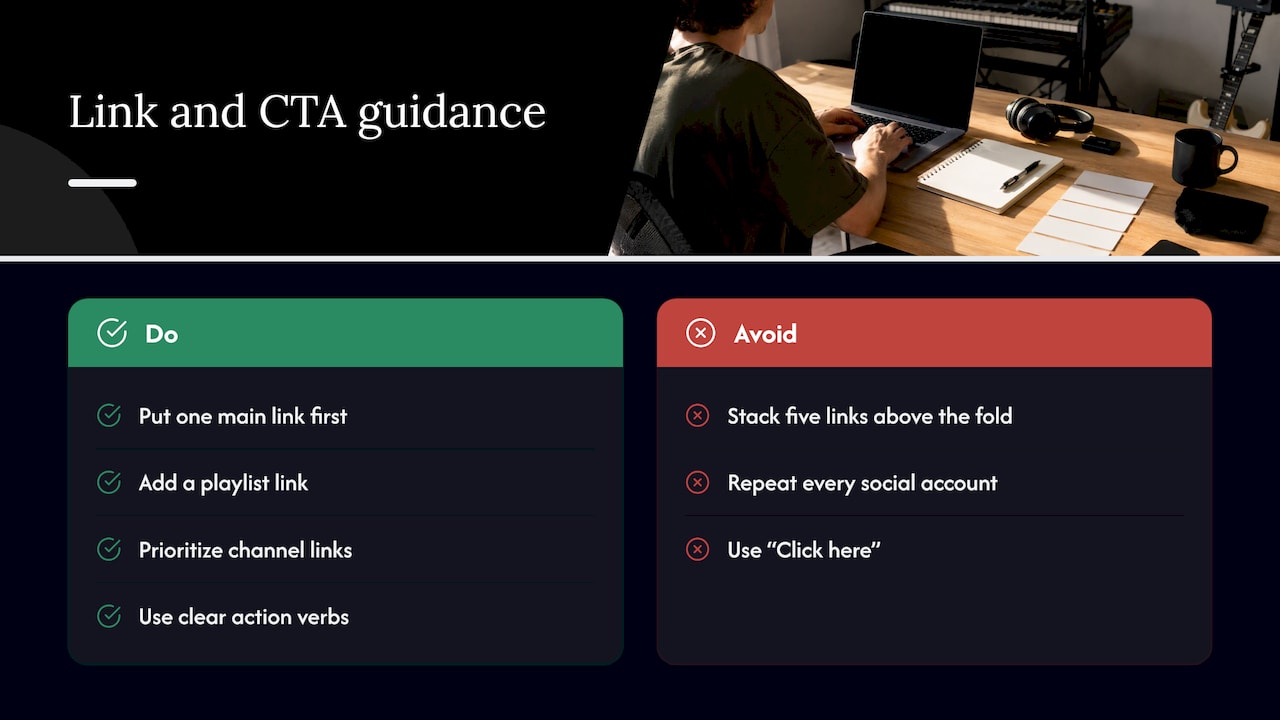
One main link in the first lines. Usually the streaming link or a smart link that gathers several services. Do not stack five links above the fold.
Add a playlist link. YouTube for Artists notes that playlist links in descriptions can help interested viewers start a viewing session, and that playlists are an important traffic source for music viewership. A link to your best-of or latest-releases playlist turns one view into several.
Keep channel links in order of priority. On an Official Artist Channel, YouTube says you can feature up to 14 links on the Home tab: the first appears prominently near Subscribe, and the rest sit in the links or About area. Put your most valuable destination first. This is channel-level, so the description does not need to repeat every social account; a short line with two or three is enough.
Use a clear verb. “Stream”, “Subscribe”, “Watch next” and “Get tickets” tell the viewer what happens when they click. “Click here” does not.
Keywords and tags without stuffing
Search on YouTube does read descriptions. YouTube Help advises giving each upload a unique description and choosing one or two main descriptive words to use prominently in both the title and the description. It also suggests researching ideas in YouTube Analytics’ Research tab and Google Ads Keyword Planner.
For a music release, “descriptive words” usually means genre, mood, instrument, language or use case: “acoustic folk ballad”, “late-night drive”, “drill instrumental”. They belong in a natural sentence, not a list. CD Baby’s guidance makes the same point: a clear title, useful description and strong thumbnail help viewers understand a video, and it advises against repeating keywords. Write for a person first.
If tags are on your checklist, our guide to YouTube tags for music covers what to add and what to skip. And because the thumbnail and title do much of the persuading before anyone reads the description, thumbnail testing is worth building into your release routine.
How long should it be?
The maximum is 5,000 characters. Most music descriptions need a fraction of that. A useful working range is a tight opening of two or three lines, a short story, a credit block and a link block. If you are publishing lyrics, the description will naturally run longer, and that is fine as long as the action and the main link sit at the top.
A template you can copy
This is an invented example to show the order. Replace everything in brackets.
[Artist Name], "[Song Title]" (Official Video). Stream the single: [link]
Subscribe for new releases: [channel link]

[Two or three sentences: what the song is about, where it was written or filmed, what the video shows.]

Watch next: [playlist link]

CREDITS
Written by [names]
Produced by [name]
Mixed by [name] | Mastered by [name]
Video: [filmmaker or production credit], edited by [name]
Label: [label] | Management: [name]

LYRICS
[Verse excerpt or full lyrics]

FOLLOW [Artist Name]
[Instagram] [TikTok] [Website]

TOUR AND MERCH
[Dates link] [Merch link]
The structure works for a single, a lyric video, a live session or a visualiser. Change the story line and the action; keep the skeleton.
Making it routine across a catalogue
If you manage several artists or a back catalogue, the description should be a template with a few fields that change, not a fresh document every time. Keep one master template per artist, with the credits block and social links pre-filled. For each release, you change the title, the opening action, the story line, the lyrics and the credits.
Tidy file names help the same workflow. When your audio, artwork and video exports are named consistently, it is far easier to match the right assets to the right upload; our file naming guide for music videos lays out a practical convention.
One more habit: review descriptions after a release goes live. Open the page as a viewer would, on mobile, and check that the main link works and that the first lines read cleanly before the cut.
What changed recently, and what applies to UK artists
The guidance above comes from YouTube’s current help and artist resources and from 2026 label-services advice. The fundamentals have stayed steady: a 5,000-character limit, a preview before expansion and unique descriptions for each upload. Because YouTube updates its help pages, check the Tips for video descriptions page and the YouTube for Artists resources before a major release, rather than relying on an old screenshot or blog post.
A strong description needs a strong video
Descriptions get people to press play; the video keeps them watching. For many independent artists, the obstacle is not the words but the footage: a custom shoot costs time and money you may not have at release.
Music Video Marketplace is a marketplace of human-made, ready-to-edit, full-length music videos. Every video is originally produced by professional filmmakers specifically for music, never created with AI or generic stock footage. You upload your audio and branding, customise the video and export it in a YouTube-ready format. You can also generate short social media clips and launch an ad campaign for your song.
Membership is £19.99 per month, and recurring extra videos are £9.99 per month per video. Full details are on the pricing page.
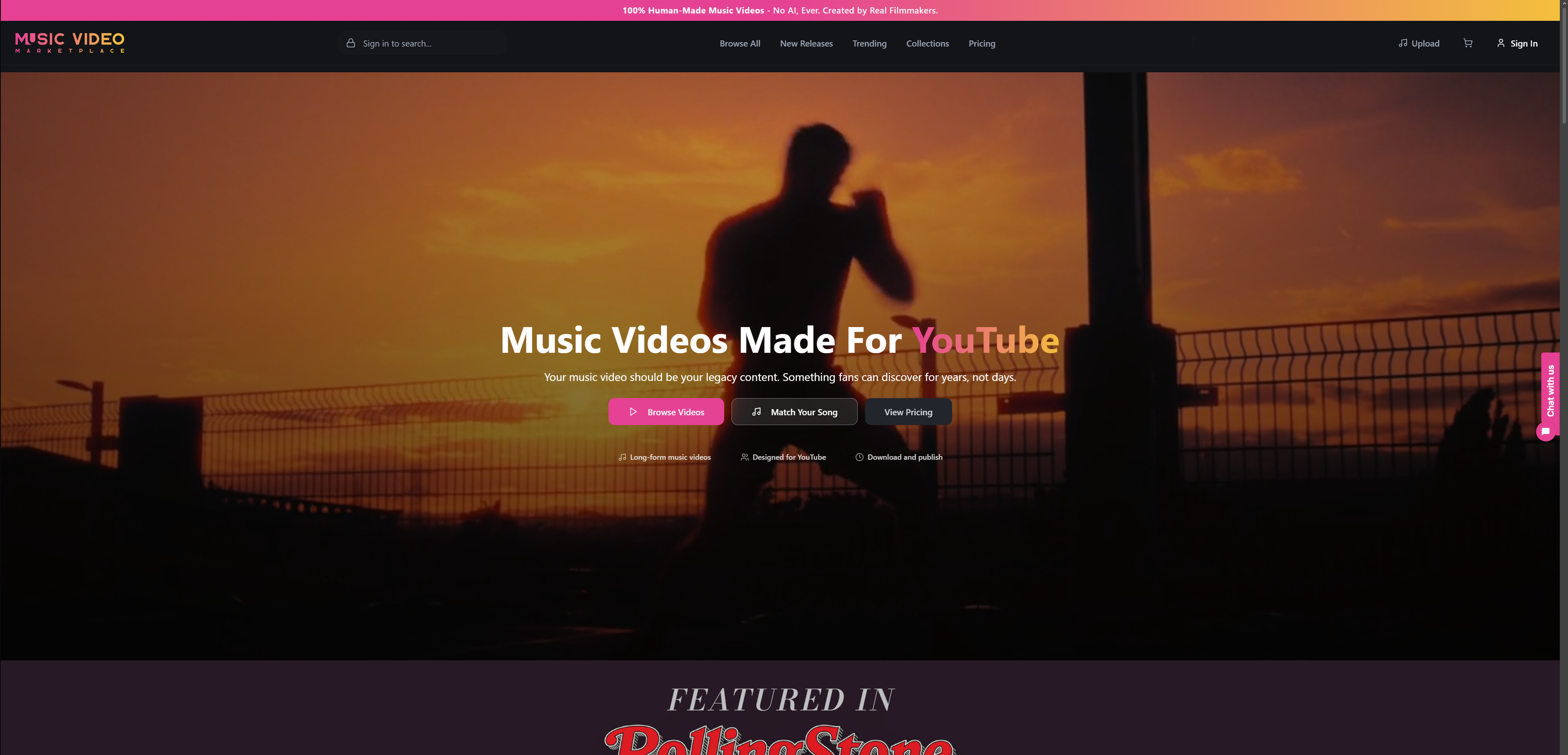
If you are a label or manager with several releases a quarter, the same approach gives each artist a full-length video without a separate shoot. Browse the music video catalogue to see what is available, and see our comparison of ready-made videos and editing apps or templates if you are weighing up routes.
Our view on descriptions
Most artists treat the description as an afterthought, pasted in minutes before upload. We think of it as half of the release page, and the video as the other half.
The pattern we like is simple: one action at the top, a short human story, a credit block and one playlist link. It reads as a finished release, which is exactly how a viewer decides whether to subscribe.
That is also why we built our catalogue around full-length, human-made videos by professional filmmakers. When the footage is made specifically for music and can be customised with your audio and branding in minutes, you spend your release week on the part only you can do: telling people why this song matters, in your own words.
Write the description after the video is final, so the story line matches what viewers actually see.
Music
FAQ
What can I write in my YouTube description?
Start with the artist name, song title and one clear action, then add a short story about the release. Below that, include credits, lyrics, playlist and social links, and tour or merch links. YouTube’s own artist guidance suggests using the visible portion for calls to action and the lower part for the rest.
How long can a YouTube description be?
Up to 5,000 characters. YouTube does not state a fixed length for the preview shown before viewers expand the text, so put the artist, song and main link in the first lines and check how it displays on your phone and on desktop.
Should I use the same description for every video?
No. YouTube Help advises a unique description for each upload. Reuse your credit and social-link blocks as a template, but change the opening, the story and the specific links for every release.
Do I need keywords in a music description?
Use one or two descriptive words, such as the genre or mood, in both title and description, written naturally. Repeating keywords is not recommended, and clear language helps viewers as much as search.
Sources
- YouTube Official Artist Channel Playbook
- YouTube for Artists: how to build your channel
- Tips for video descriptions, YouTube Help
- How to promote your music on YouTube, CD Baby
- How to Promote a Music Video: 9 Steps for Artists, Symphonic
Recommended
Read next
 YouTube Music Algorithm: Boosting Song Visibility FastYouTube music algorithm explained for musicians: types, ranking signals, session value, AI content labeling, and crucial mistakes to avoid.
 YouTube Music Content: Boosting Reach for MusiciansYouTube music content empowers musicians to craft engaging long-form videos, grow audiences, and maximise ad campaigns. Learn key formats and pitfalls.
 YouTube music distribution: 5 key benefits in 2026Discover how independent musicians can use YouTube for music distribution, monetisation, and discovery in 2026. Practical strategies for real growth.
 How YouTube algorithms boost musicians' song visibilityDiscover how YouTube's algorithm works for musicians in 2026. Learn proven strategies to boost song visibility, debunk myths, and grow your audience organically.
Turn the idea into a finished music video.
Drop your track into the Studio and build your visual in minutes.